Binance API Returns -2015: Check the Key, Then the IP Whitelist, Then Endpoint Permissions
-2015 comes back with one catch-all message, so you have to rule out each layer yourself. This page sets out what to print and what to compare at each one.
You place an order or query your account and get back -2015 with the message Invalid API-key, IP, or permissions for action. That one line bundles several causes together, and nothing in the response says which one you hit, so you have to rule them out in order: the key, the IP whitelist, then endpoint permissions. The spot Errors page in Binance's developer documentation lists the code like this:
-2015 REJECTED_MBX_KEY
Invalid API-key, IP, or permissions for action.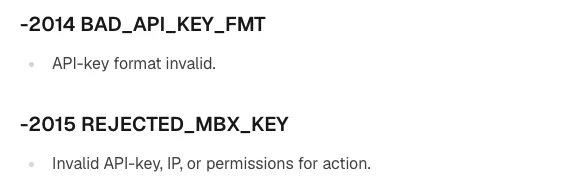
Binance's own notes on this code give three examples: a key that doesn't exist, a request that doesn't come from an allowed IP range, and an endpoint whose permission hasn't been enabled. They are examples rather than a complete list, but they are where to start. USDⓈ-M Futures uses the same code, -2015 REJECTED_MBX_KEY, with word-for-word the same message, so spot scripts and futures scripts can be checked in the same order.
Before you start, have two things ready: the request your script actually sent this time (URL, headers, parameters), and this key's settings on the API Management page. If an AI wrote the script, reading the key, computing the signature and sending the request may be spread across several functions; printing those values on the line just before the request goes out is quicker than reading back through the code.
1. Telling -2015 apart from -2014, -1022 and -1002 #
Several neighbouring error codes also involve the key or its permissions, so first make sure which one you actually got:
| Code (USDⓈ-M name) | Message | What it means | Check first |
|---|---|---|---|
| -2014 BAD_API_KEY_FMT | API-key format invalid. | The API key's format is invalid | The characters of the key string in the request header |
| -2015 REJECTED_MBX_KEY | Invalid API-key, IP, or permissions for action. | Key doesn't exist, IP outside the allowed range, endpoint permission not enabled, and so on | Sections 2–4 below |
| -1022 INVALID_SIGNATURE | Signature for this request is not valid. | The signature is wrong, usually because the client code uses the wrong API secret | The secret used to compute the signature |
| -1002 UNAUTHORIZED | You are not authorized to execute this request. | Not authorized; check the key's API permissions | Which permissions this key has |
If the code you got is -1021, the problem is the timestamp and has nothing to do with the key; work through the -1021 timestamp checklist instead.
2. Check that the request header carries the key you think it does #
In Binance's request examples, the key goes in the X-MBX-APIKEY request header. System-generated keys use HMAC, and creating one gives you two strings: the API key and the Secret Key. The API key goes in the header; the Secret Key is only for computing the signature, so don't swap them. Self-generated Ed25519 or RSA keys work differently: you create the public-private key pair yourself with third-party software and give Binance only the public key.
Check these one by one:
- Just before the request goes out, print the length and the first and last few characters of the key actually being sent, and compare them character by character with the one you saved, looking for an extra space or line break, or a missing character.
- Confirm on the API Management page that the key still exists. If you notice unusual activity in your account, revoke all your keys immediately and contact Binance support; if you have revoked keys, switch the script's configuration to the newly created one.
- Make sure the key and the endpoint come from the same environment. Spot Testnet keys are generated separately on the testnet site and don't work with your main account. If a script sends a testnet key to
api.binance.com, or a main-account key to the testnet, the server can't find that key, and you most likely land in the "key doesn't exist" case of -2015.
For a side-by-side list of testnet and live endpoints, see Binance Spot Testnet: Test AI-Written Trading Scripts First.
3. The IP whitelist needs the IPv4 address your script sends from #
The second case is a request that doesn't come from an allowed IP range. Once a key has IP access restrictions, requests have to come from an address on the list; if the script moves to another machine or network and its outgoing address isn't listed, the request is refused.
Skipping the whitelist has a cost too. A system-generated HMAC API key without IP access restrictions has no permissions other than reading. To enable other permissions, you have to add IP access restrictions (IPv4 format), use a self-generated key (such as Ed25519 or RSA), or disable the default security controls. Withdrawal permission has no alternative: adding IP access restrictions in IPv4 format is mandatory (Binance FAQ, How to Create API Keys on Binance?).
The whitelist only takes IPv4 addresses, and which address to enter is something you have to check yourself:
- Look up the outgoing IPv4 address on the machine that runs the script, not on your own computer. If the script runs on a cloud server, check it on that server.
- Home broadband and phone hotspots can change their outgoing address. If a script that ran fine last week suddenly returns -2015 today, start by comparing the current outgoing address with the one on the whitelist.
4. Spot trading, futures and withdrawals each need their own permission in API Management #
Every endpoint name has its security type next to it; the order endpoint, for example, is labelled New order (TRADE). An endpoint without one counts as NONE, and every endpoint with a security type is a SIGNED request that needs a signature. A key can be limited to certain types of endpoint. By default an API key cannot TRADE; you have to enable trading in API Management first.
| Endpoint you want to call | Security type / permission | What it takes to enable |
|---|---|---|
| Public market data | NONE | No signature needed |
| Account information such as order status and trade history | USER_DATA | Binance's example: a separate key with only USER_DATA permission can monitor order status |
| Spot orders and cancellations | TRADE, with trading enabled in API Management | A system-generated HMAC key first has to meet one of the conditions in section 3 |
| Futures orders | Futures permission | If the key was created before you enabled your Futures account, or you have activated Portfolio Margin, the key can't enable Futures permission |
| Withdrawals | Withdrawal permission | IP access restrictions in IPv4 format are mandatory |
The futures row is the easy one to miss. When checking, look at when the key was created, before or after you opened your Futures account, and whether the account has Portfolio Margin activated. The read-only limit on keys without an IP whitelist isn't new: Binance states that from 2023-01-30 00:00 (UTC), a system-generated API key's permission can only be set to [Enable Reading] if its IP access is unrestricted.
When you have an AI write the script, ask it to list every endpoint it calls together with its security type, then compare that list with the permissions actually ticked in API Management. If the AI only reads data and never places orders, the permission level you need is covered in our guide to a read-only Binance API key for AI.
5. How the key was created decides which endpoints it can call #
Can a Binance API key place orders without an IP whitelist?
Not a system-generated HMAC key: without IP access restrictions it only has read permission. To enable trading, add an IPv4 whitelist, switch to a self-generated key (such as Ed25519 or RSA), or disable the default security controls.
Binance API returns -1022 invalid signature: where should I look?
-1022 means the signature in the request doesn't match the one the server computes by its rules, and the usual cause is a wrong API secret in the client code. Check first that the signature is computed with the Secret Key paired with this API key, then that the parameter string you signed matches what was actually sent.
How do I enable futures trading permission on a Binance API key?
Enable Futures permission for the key in API Management. It only works if the key was created after you enabled your Futures account and the account doesn't have Portfolio Margin activated. A key created before the Futures account, or on an account with Portfolio Margin, can't get this permission.
— PromptDeck, 2026-10-24