Binance API Error -1021: Timestamp 1 Second Ahead or Outside of the recvWindow
-1021 is the Binance Spot API's timestamp error: the timestamp on the request is either more than 1 second ahead of server time or old enough to fall outside recvWindow. The two places to look are the local clock and the line in your script that generates the timestamp.
"Timestamp for this request was 1000ms ahead of the server's time." and "Timestamp for this request is outside of the recvWindow." are two messages filed under a single error code in Binance's documentation: -1021 INVALID_TIMESTAMP. Either one means the server refused the timestamp on the request, and the request was turned away before it was forwarded to the matching engine.
1. The Two Messages Point in Opposite Directions #
In errors.md, part of Binance's official Spot API documentation repository binance/binance-spot-api-docs, -1021 carries two messages. Verbatim:
-1021 INVALID_TIMESTAMP
Timestamp for this request is outside of the recvWindow.
Timestamp for this request was 1000ms ahead of the server's time.
errors.md does not say what triggers each one. Read against the server-side logic in rest-api.md from the same repository, each message maps to one direction. The Chinese edition of the error list in that repository, errors_CN.md, states the split outright: one entry is for too much delay, where the server judges from the request's timestamp that the elapsed time is already beyond recvWindow, and it suggests improving the network or raising recvWindow; the other is for a client time more than 1 second ahead of server time, with a note that this value cannot be adjusted by the client.
- "1000ms ahead": the timestamp in the request is more than 1 second ahead of the server's current time, as if the request came from the future. The most direct cause is a local clock running ahead of the server's.
- "outside of the recvWindow": the timestamp is too old, and server time minus the timestamp already exceeds recvWindow. A slow local clock, a long one-way network trip or a timestamp generated too early will each land here, alone or combined.
Knowing which message you received settles half the troubleshooting. With the first, look for whatever put the timestamp ahead of the server. With the second, look for where the delay was added: the local clock, the network, or the point in the code where the timestamp is generated. An error of -1022 INVALID_SIGNATURE ("Signature for this request is not valid.") is a failed signature check, a separate problem from timestamps.
2. How the Server Decides Whether a Timestamp Is Acceptable #
The Timing security section of rest-api.md sets the rule: besides a signature, SIGNED requests require a timestamp parameter holding the current timestamp, in either milliseconds or microseconds. An optional parameter, recvWindow, specifies how long the request stays valid. It may only be given in milliseconds, with up to three decimal places so that microseconds can be expressed; the docs' example is 6000.346. If recvWindow is not sent it defaults to 5000 milliseconds, and the maximum is 60000 milliseconds.
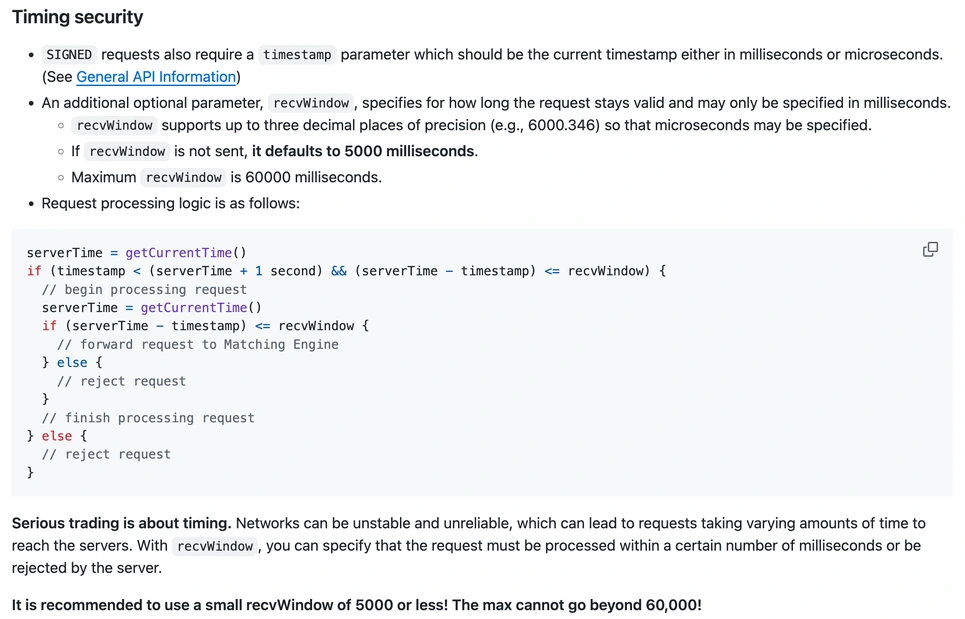
The pseudocode in that screenshot comes down to two checks, one after the other:
- When the request arrives, the server reads its clock once as serverTime. Processing begins only if two conditions hold together: timestamp is less than serverTime plus 1 second, and serverTime minus timestamp is no greater than recvWindow.
- Once processing has begun, the server reads serverTime again. The request is forwarded to the matching engine only if serverTime minus timestamp is still no greater than recvWindow; otherwise it is rejected.
The first condition covers a timestamp that is too far ahead, and its tolerance is fixed at 1 second whatever recvWindow is set to. The second covers a timestamp that is too old, and its ceiling is recvWindow itself. The window is counted from the moment recorded in timestamp, not from the moment the request reaches the server, so the time lost on the network and the time between the server's first and second clock readings both come out of the same window.
The four cases below assume the default recvWindow of 5000 milliseconds. The figures are invented for illustration, all in milliseconds. On arrival, serverTime minus timestamp equals the one-way network time minus the amount the local clock is ahead; with a slow clock, it is the one-way time plus the amount the clock is behind.
| Case | Local clock | One-way time | serverTime − timestamp on arrival | Result |
|---|---|---|---|---|
| A | 1,200 ahead | 100 | 100 − 1,200 = −1,100 | More than 1,000 ahead: the "ahead" message |
| B | 1,200 ahead | 300 | 300 − 1,200 = −900 | Both conditions met: accepted |
| C | 4,500 behind | 600 | 600 + 4,500 = 5,100 | Over 5,000: the "outside of the recvWindow" message |
| D | 4,500 behind | 300 | 300 + 4,500 = 4,800 | Clears the first check with only 200 to spare |
A and B have clocks that are ahead by the same amount yet end differently, because B's network time cancels part of the lead. By the pseudocode, a machine whose clock runs a little over 1 second fast will return the "ahead" message on and off as the network speeds up and slows down, which looks like an intermittent fault. D clears the first check, but the server reads the time again once processing starts; when the remaining 200 milliseconds are used up, the request is still rejected, this time at the second check.
3. Is Your Clock Ahead or Behind? Measure It with /api/v3/time #
GET /api/v3/time sits under Check server time in rest-api.md: it tests connectivity to the REST API and returns the current server time, takes no parameters and has a weight of 1.
The method: note local time t0 just before sending the request and local time t1 when the response arrives, then treat (t0 + t1) / 2 as the local time at the instant the server produced serverTime. Offset = serverTime − (t0 + t1) / 2, and round trip = t1 − t0. A positive offset means the server is ahead of your machine, so your clock is slow; a negative one means your clock is fast. Taking the midpoint assumes the outbound and return legs take about the same time. Where the route is asymmetric, the offset you get carries some error.
# Measure the clock offset between this machine and Binance's server (illustrative)
import time
import requests

def local_ms():
    return time.time() * 1000

for i in range(3):
    t0 = local_ms()
    server = requests.get("https://api.binance.com/api/v3/time").json()["serverTime"]
    t1 = local_ms()
    offset = server - (t0 + t1) / 2
    print(f"offset {offset:+.0f} ms, round trip {t1 - t0:.0f} ms")
The figures below are assumed, to show the arithmetic: suppose three calls to /api/v3/time in a row, measured with the script above, come back with the offsets and round trips in the table, where the round trip is deliberately set on the long side.
| Item | Three results (ms) | Mean of three |
|---|---|---|
| Offset: serverTime − (t0 + t1) / 2 | +792, +800, +812 | (792 + 800 + 812) / 3 ≈ +801 |
| Round trip: t1 − t0 | 1,425, 1,438, 1,460 | (1,425 + 1,438 + 1,460) / 3 ≈ 1,441 |
The offset is positive, so in this example the machine's clock is about 0.8 seconds behind the server, and the assumed round trip averages about 1.4 seconds.
Carry those numbers over to a signed request sent from the same machine. The timestamp is about 800 milliseconds behind server time, and the one-way time, taken as half the round trip, is about 720 milliseconds (1,441 / 2). On arrival, serverTime − timestamp comes to roughly 800 + 720 = 1,520 milliseconds, inside the default 5000, so -1021 is not triggered. For this machine to hit the error, the amount its clock is behind plus the one-way time would have to exceed recvWindow, which gives "outside of the recvWindow"; or, in the opposite direction, its clock would have to be more than 1 second ahead of the server with too little network time to cancel the excess, which gives "ahead". Your own machine needs its own measurement with the script above.
4. What to Check, in Order: Raising recvWindow Comes Last #
Go through the steps in this order, and stay on each one until it has been ruled out.
- Read the message. If it says "1000ms ahead", go straight to checking whether the local clock is fast; changing recvWindow does nothing for this one, because the 1-second tolerance is fixed. If it says "outside of the recvWindow", carry on down the list.
- Measure the offset. Run the script from the previous section several times. An offset close to 1 second or more is a clock problem; a small offset with a long round trip points to the network leg.
- Turn on automatic time synchronization in the operating system. Measure again afterwards to confirm the offset has come down. If the script runs on a cloud server or on another computer, that machine's clock is the one to measure and to sync.
- Find the step in the code where timestamp is generated. Take the current time fresh before every signature; on a retry, generate a new timestamp and a new signature instead of reusing the query string built the first time. The next section sets the patterns side by side.
- If the first four are done and the network really is slow, raise recvWindow by a modest amount. The Timing security section says in bold: "It is recommended to use a small recvWindow of 5000 or less! The max cannot go beyond 60,000!"
Raising recvWindow comes last because the window is itself a safeguard. The same section contains the line "Serious trading is about timing." and goes on to explain that networks can be unstable, so requests take varying amounts of time to reach the servers, and that recvWindow lets you specify that a request must be processed within a certain number of milliseconds or be rejected. With the window stretched to 60000, an order request signed a minute ago can still reach the matching engine, by which time the market may no longer look the way it did when you built the request.
5. When AI Writes the Signing Code, Find the Line That Sets timestamp #
When ChatGPT or Claude writes a script that calls the Binance API, the line that sets timestamp is easy to skim past. Below are two ways that line goes wrong; either can turn up in AI-generated code or in code written by hand. The code is pseudocode showing only the step where timestamp is generated. It contains no real key and is not a complete program that can place orders.
Mistake one: the timestamp is generated once at program startup and reused for every request afterwards. Assume an accurate local clock and negligible network time: 5 seconds after startup, serverTime − timestamp passes the default 5000, and even with recvWindow at its maximum of 60000 the script lasts only until the 60th second. The symptom is a script whose first few requests succeed and whose later ones all return "outside of the recvWindow"; when you see that, check for this mistake first.
Mistake two: the first request is built and signed, and each retry resends the identical query string. If the first attempt returned -1021 because it was slow, the resent timestamp is only older, and every retry ends the same way. Swapping in a new timestamp without recomputing the signature fails too: timestamp is one of the signed parameters, so the old signature no longer matches the new parameters.
# now_ms(), sign(), sign_all(), send() and is_error() are placeholder functions; the key and secret are read from environment variables

# Mistake one: generated once at startup, reused from then on
TS = now_ms()
def signed_request(path, params):
    params["timestamp"] = TS               # always the moment of startup
    params["signature"] = sign(params)
    return send(path, params)

# Mistake two: signed once, resent unchanged on every retry
query = sign_all({**params, "timestamp": now_ms()})
for attempt in range(3):
    resp = send(path, query)               # carries the first timestamp every time
    if not is_error(resp, -1021):
        break

# Correct pattern: take the time and sign right before each send; a retry starts from the top
def signed_request(path, params):
    p = dict(params)
    p["timestamp"] = now_ms()              # generated right next to the signature
    p["recvWindow"] = RECV_WINDOW           # a config setting, default 5000
    p["signature"] = sign(p)               # timestamp is signed, so a new one means signing again
    return send(path, p)

for attempt in range(3):
    resp = signed_request(path, params)
    if not is_error(resp, -1021):
        break
In the correct pattern the retry calls the whole of signed_request, so every round takes a fresh time and signs again. If the clock itself is off, these retries will all fail as well, and you are back at steps 2 and 3 of the previous section.
When you ask an AI for this part of the code, you can paste the lines below ahead of your requirements:
When writing signed requests to the Binance Spot API, follow these three rules:
1. Generate timestamp inside the signing function, on the line right next to the signature. Do not generate it at program startup and reuse it.
2. On any retry, generate a new timestamp and sign again. Do not resend a query string that was built earlier.
3. Make recvWindow a config setting with a default of 5000. On -1021, print the full error message; do not raise recvWindow automatically.
Use placeholders for the API key and secret in every example, and read them from environment variables.
When the code comes back, find the line where timestamp is assigned and check that it sits inside the signing function and runs on every request. Run the corrected script on the Binance Spot Testnet first, create the key you use live along the lines of the Binance API key setup for AI, and keep an AI-generated loop away from the decisions listed among the things you must never ask AI to do in crypto trading.
— PromptDeck, 2026-09-23