Binance API Order Rejected with -1013? The Filter Name in the msg Tells You What to Fix
-1013 means the order was turned away at the API layer. When the msg starts with Filter failure, read the upper-case name after the colon; if it has some other format, look it up in the Failures during order placement table on the Errors page.
When the order endpoint returns -1013, the request was rejected at the API layer. It never reached the matching engine, so no order was placed. Which check stopped it is in the msg field of the response: when it reads like Filter failure: LOT_SIZE, the upper-case name after the colon is the filter that failed. Find the group with the same name in that trading pair's filter rules, bring the quantity or price back inside its limits, then sign the request and send it again.
The Spot Errors page in Binance's developer documentation describes -1013 in three lines:
-1013 INVALID_MESSAGE
The request is rejected by the API. (i.e. The request didn't reach the Matching Engine.)
Potential error messages can be found in Filter Failures or Failures during order placement.
Which filters a trading pair carries, and their values, are all in the /exchangeInfo response, with each group labelled by filterType. Before you start, have two things in front of you: the full set of parameters you sent this time (symbol, side, type, price, quantity) and the raw filter rules for that pair. In the documentation's examples these values are quoted strings, such as "stepSize": "0.00100000". Load them when the script starts instead of copying them into the code as constants. If the code you got back is -1021, the problem is the timestamp and has nothing to do with filters; work through the -1021 checks for a timestamp outside recvWindow instead.
1. Work Out Which Filter Blocked the Order from the -1013 msg #
The Filter failures table on the Errors page pairs each message with an explanation. The ones below concern the parameters of a single order, so the fix goes into the order itself:
| msg as returned | What it means, per the docs | Fields to compare in the filter rules |
|---|---|---|
| Filter failure: PRICE_FILTER | Price too high or too low, or not a multiple of the tick size | minPrice, maxPrice, tickSize |
| Filter failure: PERCENT_PRICE | Price too far from the recent average trade price | multiplierUp, multiplierDown, avgPriceMins |
| Filter failure: PERCENT_PRICE_BY_SIDE | As above, with a separate set of multipliers for the buy side and the sell side | bidMultiplierUp / Down, askMultiplierUp / Down, avgPriceMins |
| Filter failure: LOT_SIZE | Quantity too large or too small, or not a multiple of the step size | minQty, maxQty, stepSize |
| Filter failure: MARKET_LOT_SIZE | Quantity on a market order too large or too small, or not a multiple of the step size | minQty, maxQty, stepSize in the MARKET_LOT_SIZE group |
| Filter failure: MIN_NOTIONAL | price * quantity too low | minNotional, applyToMarket, avgPriceMins |
| Filter failure: NOTIONAL | price * quantity not between minNotional and maxNotional | minNotional, maxNotional, applyMinToMarket, applyMaxToMarket |
| Filter failure: ICEBERG_PARTS | Iceberg order split into too many parts; icebergQty too small | limit (parts are counted as CEIL(qty / icebergQty)) |
| Filter failure: TRAILING_DELTA | trailingDelta outside the range allowed for that order type | minTrailingAboveDelta, maxTrailingAboveDelta, minTrailingBelowDelta, maxTrailingBelowDelta |
Another group of messages is about the state of the account. MAX_NUM_ORDERS, MAX_NUM_ALGO_ORDERS, MAX_NUM_ICEBERG_ORDERS and MAX_NUM_ORDER_LISTS mean there are already too many open orders, stop-loss and take-profit orders, iceberg orders or order lists on that pair; the four versions prefixed with EXCHANGE_ count across every pair on the account. What needs fixing here is how many orders you have open: cancel the ones you no longer need, then send again. On the Filters page, algo orders means four types, STOP_LOSS, STOP_LOSS_LIMIT, TAKE_PROFIT and TAKE_PROFIT_LIMIT, and the general open-order cap maxNumOrders counts algo orders too. When one order has been amended too many times, the message table on the Errors page writes it as Filter failure: MAX_NUM_ORDER_AMENDS, while the Filters page says you will get -2038, so check for both forms.
MAX_POSITION counts a position as the sum of three things: the free balance of the base asset, the locked balance, and the quantity of every open buy order. Buy orders are rejected once the position is above maxPosition, and a new buy order that would take the position past the cap fails too. To keep buying, sell part of the holding first or cancel buy orders that are still open.
2. LOT_SIZE Errors: Check minQty, maxQty and stepSize #
LOT_SIZE governs quantity. It checks quantity, and an iceberg order's icebergQty is held to the same rules. All three conditions have to hold at once:
quantity >= minQty
quantity <= maxQty
quantity % stepSize == 0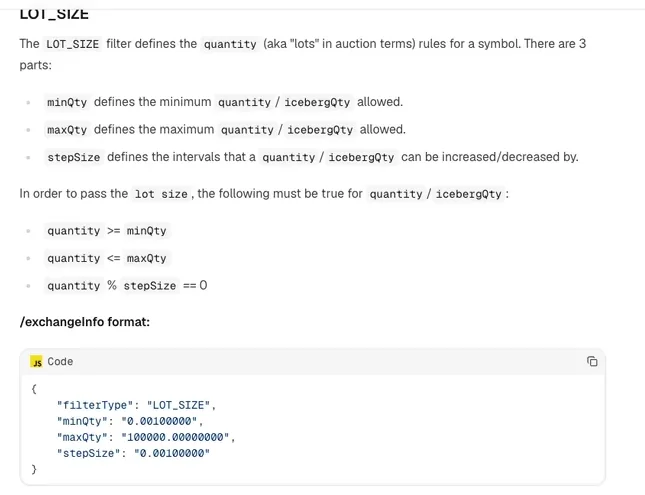
The modulo line requires the quantity to be an exact multiple of stepSize. With a stepSize of 0.001, 0.003 and 0.125 pass and 0.0031 fails, because 0.0031 ÷ 0.001 = 3.1, which is not a whole number.
Doing this step with floating-point numbers invites trouble. Decimals such as 0.1 and 0.001 cannot be stored exactly in binary floating point, so modulo and division leave tiny remainders: the quantity looks aligned, yet once it is turned into a string and sent it carries a long tail of decimal places. Handle quantity and price with a decimal type instead. In Python that is decimal.Decimal, built straight from the strings /exchangeInfo returns.
If the response is not -1013 but -1111 BAD_PRECISION, message "Parameter '%s' has too much precision.", one of the parameters has too many decimal places. Print the quantity and price strings exactly as they were sent and compare their decimal places with those of stepSize and tickSize.
3. Limit Order Blocked by PRICE_FILTER or PERCENT_PRICE: Fixing the Price #
PRICE_FILTER has three settings, minPrice, maxPrice and tickSize, and it checks price; the stopPrice on stop orders has to pass it too. Any of the three that is set to 0 is switched off. The ones in force must satisfy:
price >= minPrice
price <= maxPrice
price % tickSize == 0
With a tickSize of 0.01, 3,217.45 passes and 3,217.453 fails. Which way you round is up to you: on a buy order, rounding the price down is more cautious and rounding up makes a fill more likely; on a sell order it is the reverse.
PERCENT_PRICE has no fixed floor or ceiling. It looks at how far the price is from the recent average trade price, which is taken in this order: if the pair has a non-empty reference price, that is used; if not, the volume-weighted average price over the previous avgPriceMins minutes; if avgPriceMins is 0, the last traded price. A limit price has to fall between "average × multiplierDown" and "average × multiplierUp". In the documentation's example multiplierUp is 1.3 and multiplierDown is 0.7, so with an average of 100 you can place orders between 70 and 130 (100 × 0.7 = 70, 100 × 1.3 = 130).
PERCENT_PRICE_BY_SIDE splits the multipliers by direction: buy orders are compared with bidMultiplierUp and bidMultiplierDown, sell orders with askMultiplierUp and askMultiplierDown. If a limit order placed far from the market price is rejected, first confirm in the /exchangeInfo response which of the two the pair uses, then pull the price back in with the multipliers for that side.
4. NOTIONAL and MIN_NOTIONAL Both Check Price × Quantity #
Notional value is simply price × quantity. The Filters page writes this check as two separate filters, each with its own fields:
| Filter | Passes when | Checked on market orders? |
|---|---|---|
| MIN_NOTIONAL | price * quantity >= minNotional | Decided by applyToMarket |
| NOTIONAL | price * quantity >= minNotional and price * quantity <= maxNotional | Floor decided by applyMinToMarket, cap by applyMaxToMarket |
Which one a pair carries shows up as the filterType in its filter rules. Your order function needs to recognise both, compare against whichever is present, and on an error look up the group named in the msg.
Market orders carry no price, so the "price" multiplied by quantity is taken the same way as the PERCENT_PRICE average: the reference price if a non-empty one exists, otherwise the volume-weighted average over the previous avgPriceMins minutes, and the last traded price when avgPriceMins is 0.
5. Why a 10 USDT Buy Order Fails NOTIONAL Once the Quantity Is Rounded #
Suppose a pair has these rules: tickSize 0.01; LOT_SIZE with minQty 0.001, maxQty 100000 and stepSize 0.001; NOTIONAL with minNotional 10 and maxNotional 10000 (the LOT_SIZE and NOTIONAL values are taken from the example JSON on the Filters page). You want to place a 10 USDT limit buy at 3,217.45, and your script works out the quantity as budget ÷ price.
| Step | Input and formula | Result |
|---|---|---|
| Raw quantity | 10 ÷ 3,217.45 | 0.003108… |
| Sent without rounding | 0.003108… ÷ 0.001 = 3.108…, not a whole number | Filter failure: LOT_SIZE |
| Rounded down to stepSize | floor(3.108…) × 0.001 | 0.003 |
| Notional after rounding | 3,217.45 × 0.003 | 9.65235, below 10: Filter failure: NOTIONAL |
| Smallest quantity that clears minNotional | ceil(10 ÷ 3,217.45 ÷ 0.001) × 0.001 = 4 × 0.001 | 0.004 |
| Notional at that quantity | 3,217.45 × 0.004 | 12.8698, between 10 and 10,000 |
Rounding the quantity down to stepSize is correct, since rounding up would spend more than the budget. The trouble comes after rounding: 0.003 is worth only 9.65235 USDT, 0.34765 short of minNotional. Because the budget equals the notional floor exactly, whenever the raw quantity is not an exact multiple of stepSize, the notional after rounding down is bound to come in under 10. At this price the smallest quantity that passes is 0.004, which costs 12.8698 USDT. If you only set aside 10 USDT, you either raise the budget or drop this order.
Build these steps into a check that runs before the order goes out, and you will know whether it can pass before any error comes back:
# Illustrative numbers; live code reads the strings returned by /exchangeInfo
from decimal import Decimal, ROUND_DOWN, ROUND_UP

step = Decimal("0.001")
min_qty = Decimal("0.001")
min_notional = Decimal("10")
price = Decimal("3217.45")
budget = Decimal("10")

qty = (budget / price / step).to_integral_value(rounding=ROUND_DOWN) * step
if qty < min_qty or price * qty < min_notional:
    need = (min_notional / price / step).to_integral_value(rounding=ROUND_UP) * step
    need = max(need, min_qty)
    print(f"Budget too small: buy at least {need}, about {price * need} USDT")
else:
    print(f"Order quantity {qty}")
With the inputs above, this prints "Budget too small: buy at least 0.004, about 12.86980 USDT". The sample only compares minQty and minNotional; add maxQty, maxNotional and the price rules in the same way. When you have AI write your order function, put three requirements in the request: read the filter values from /exchangeInfo, round with Decimal, and compare against the notional floor before sending. Then send a few small orders from the revised function on the Spot Testnet and confirm the responses match what you expect. For connecting to it, see running a trading script against the Spot Testnet.
6. MARKET_LOT_SIZE on a Market Order: Which Quantity Rules Apply #
Market orders have a quantity rule set of their own, with filterType MARKET_LOT_SIZE. The field names are again minQty, maxQty and stepSize, and the checks are the same:
quantity >= minQty
quantity <= maxQty
quantity % stepSize == 0
A market order has to pass MARKET_LOT_SIZE at the very least. The documentation does not say outright whether LOT_SIZE also applies to market orders, but the Errors page does note that a market order placed with quoteOrderQty cannot go through when liquidity on the order book is below the LOT_SIZE minimum quantity. So compare minQty, maxQty and stepSize in both groups, and try the revised logic with a few orders on the testnet first. If you get Filter failure: MARKET_LOT_SIZE, take the values from this group and round again. Before the script uses its stepSize as a divisor, check the value: if it is 0, skip rounding by it so the code never divides by zero. Whether the notional check applies to market orders comes down to three switches, applyToMarket, applyMinToMarket and applyMaxToMarket, set out in the table in section 4.
7. USDⓈ-M Futures: Matching -4164 MIN_NOTIONAL and Related Error Codes #
The Error Codes page in the USDⓈ-M futures documentation lists -1013 INVALID_MESSAGE as well, with the single message "INVALID_MESSAGE.". The quantity, price and notional checks each have a number of their own on that page:
| Error code | Message, verbatim | What it means |
|---|---|---|
| -4004 QTY_LESS_THAN_MIN_QTY | Quantity less than min quantity. | Quantity below the minimum |
| -4005 QTY_GREATER_THAN_MAX_QTY | Quantity greater than max quantity. | Quantity above the maximum |
| -4023 QTY_NOT_INCREASED_BY_STEP_SIZE | Qty not increased by step size. | Quantity not a multiple of the step size |
| -4013 PRICE_LESS_THAN_MIN_PRICE | Price less than min price. | Price below the minimum |
| -4002 PRICE_GREATER_THAN_MAX_PRICE | Price greater than max price. | Price above the maximum |
| -4014 PRICE_NOT_INCREASED_BY_TICK_SIZE | Price not increased by tick size. | Price not a multiple of the tick size |
| -4016 PRICE_HIGHTER_THAN_MULTIPLIER_UP | Price is higher than mark price multiplier cap. | Price above the cap worked out from the mark price |
| -4024 PRICE_LOWER_THAN_MULTIPLIER_DOWN | Price is lower than mark price multiplier floor. | Price below the floor worked out from the mark price |
| -4164 MIN_NOTIONAL | Order's notional must be no smaller than 5.0 (unless you choose reduce only) | Notional value below the minimum; reduce-only orders are exempt |
-4164 appears on the page in two forms. Besides the one with 5.0 written in, there is "Order's notional must be no smaller than %s (unless you choose reduce only)", where the number is the placeholder %s. The placeholder suggests the real response fills in a specific number, so do not hard-code 5 in your script as a floor shared by every contract; use the number in the error message. The part in brackets means orders set to reduce only are not subject to this limit. On the futures side, -1111 BAD_PRECISION reads "Precision is over the maximum defined for this asset."; as on spot, start by checking how many decimal places the quantity and price strings you sent carried.
— PromptDeck, 2026-10-01